Shopify removes reviews that break its rules, and its help center says it may not notify you when it does. Your review count drops, and nothing tells you which reviews went or why. To find them you need a copy of every review that was ever on your listing, compared with what is live today. AppstorePulse keeps that copy from our daily App Store data, lists every removed review with its full text and removal date, tells you the likely reason, and flags the ones worth an appeal.
Before you start
- An AppstorePulse account with your app added. The free plan shows your current reviews and about how many were removed.
- A Starter or Pro plan to see the full list of removed reviews, with the reason for each one.
- Your Shopify Partner API connected in Revenue & Churn, so each removal can be checked against your own merchant data.
- Removals from before AppstorePulse first indexed your app can't be recovered, so add your app early.
Why Shopify removes reviews
Only merchants who have your app installed can review it, or who uninstalled it in the last 45 days. Shopify blocks or removes reviews that go against its policies: fake or misleading reviews, reviews posted in exchange for a benefit, and several reviews from the same account.
Real reviews from real merchants disappear too, and Shopify's help center says you may not be notified when a review is removed. It also doesn't share how it identifies the reviews it removes. So a removal only shows up as a lower review count on your listing, if you notice it at all.
Doing it by hand
Shopify emails you each time a review of your app is published. Keep those emails, or copy every new review into a spreadsheet: store name, date, rating and text. That is your record.
Then, on a fixed day, open your listing's reviews and check each review in your spreadsheet is still there. Any review in your sheet but missing from the listing was removed. It works while you get a few reviews a month. With dozens, or a listing in several languages, the checking takes hours and you only learn which review went, not whether it was worth fighting for.
The full walkthrough
Open My Reviews
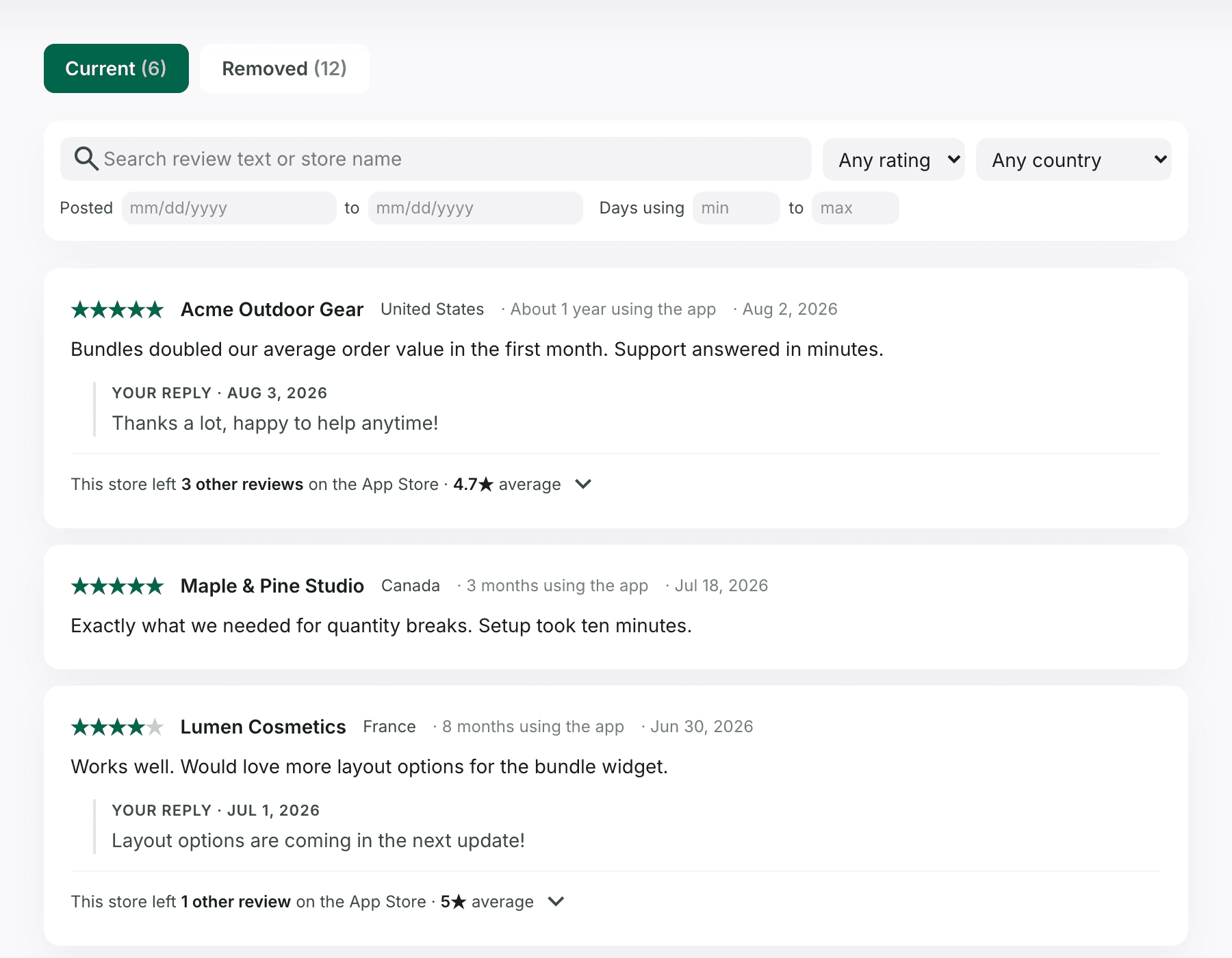
The Current tab lists every review on your listing today, newest first, with your replies. Search the text or the store name, and filter by rating, country, posting date or how long the merchant had used your app.
- Each review shows the store, its country, how long it had used your app and when it posted.
- Click "This store left N other reviews" to read what the same store said about other apps.
Open the Removed tab
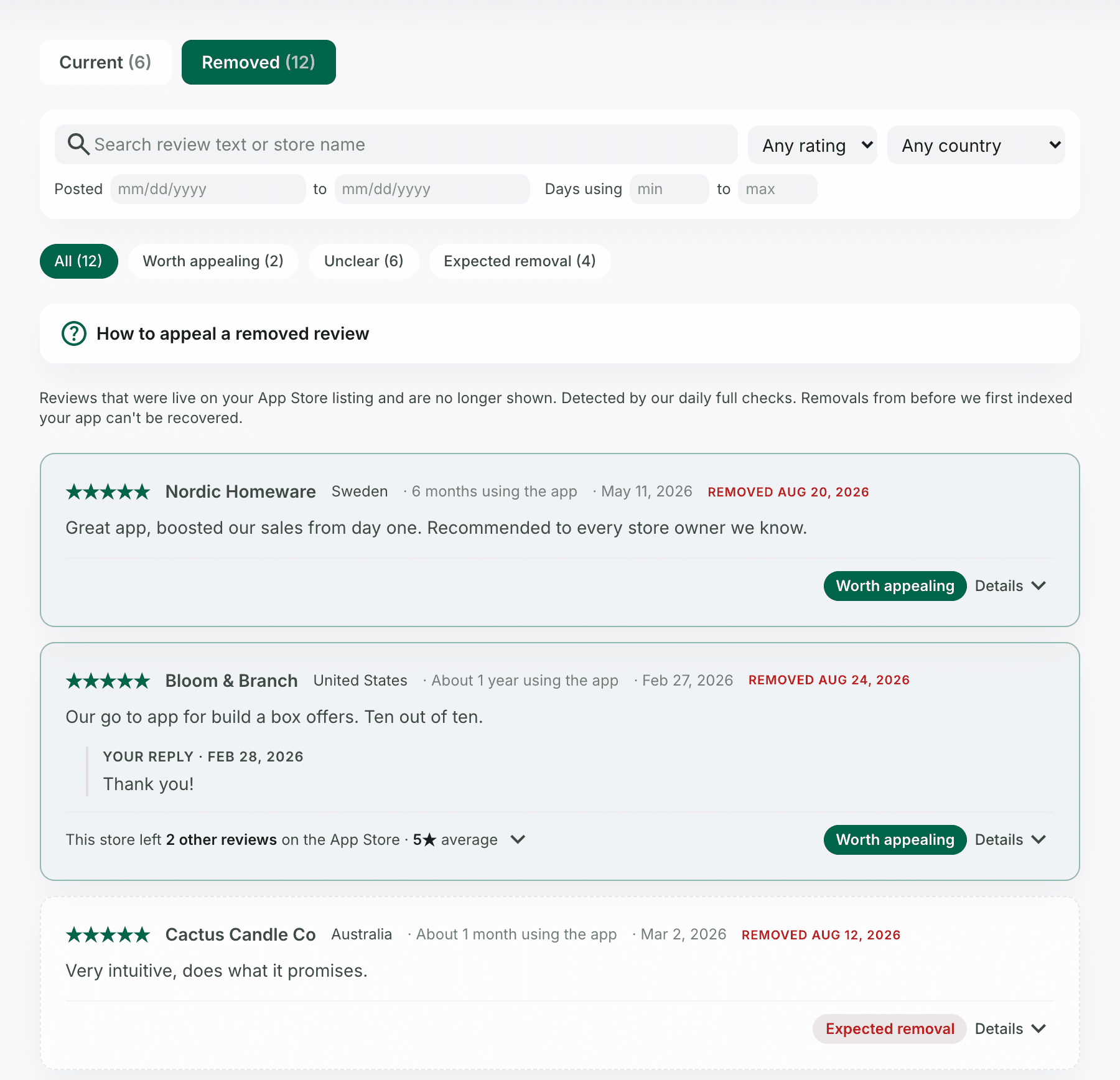
Every review that was live on your listing and is gone now, with its full original text, stars, store, your reply and the date it disappeared. A removed review stays here for good, even though Shopify no longer shows it.
- On the free plan, the tab shows about how many reviews were removed. Starter and Pro show the full list.
- The same search and filters work here, so you can find one store or every removed 5-star review.
See why each review was likely removed
With your Partner API connected, each removed review gets one of three tags. Click Details on a review to read the reason and the facts behind it.
- Expected removal: the store closed, or Shopify froze its subscription. Appeals for these are unlikely to succeed.
- Unclear: no clear reason. It could be cleanup, or the merchant deleting their own review.
- Worth appealing: the store is still active and paying for your app. Reviews like that almost never get removed, so start here.
Appeal the ones worth it
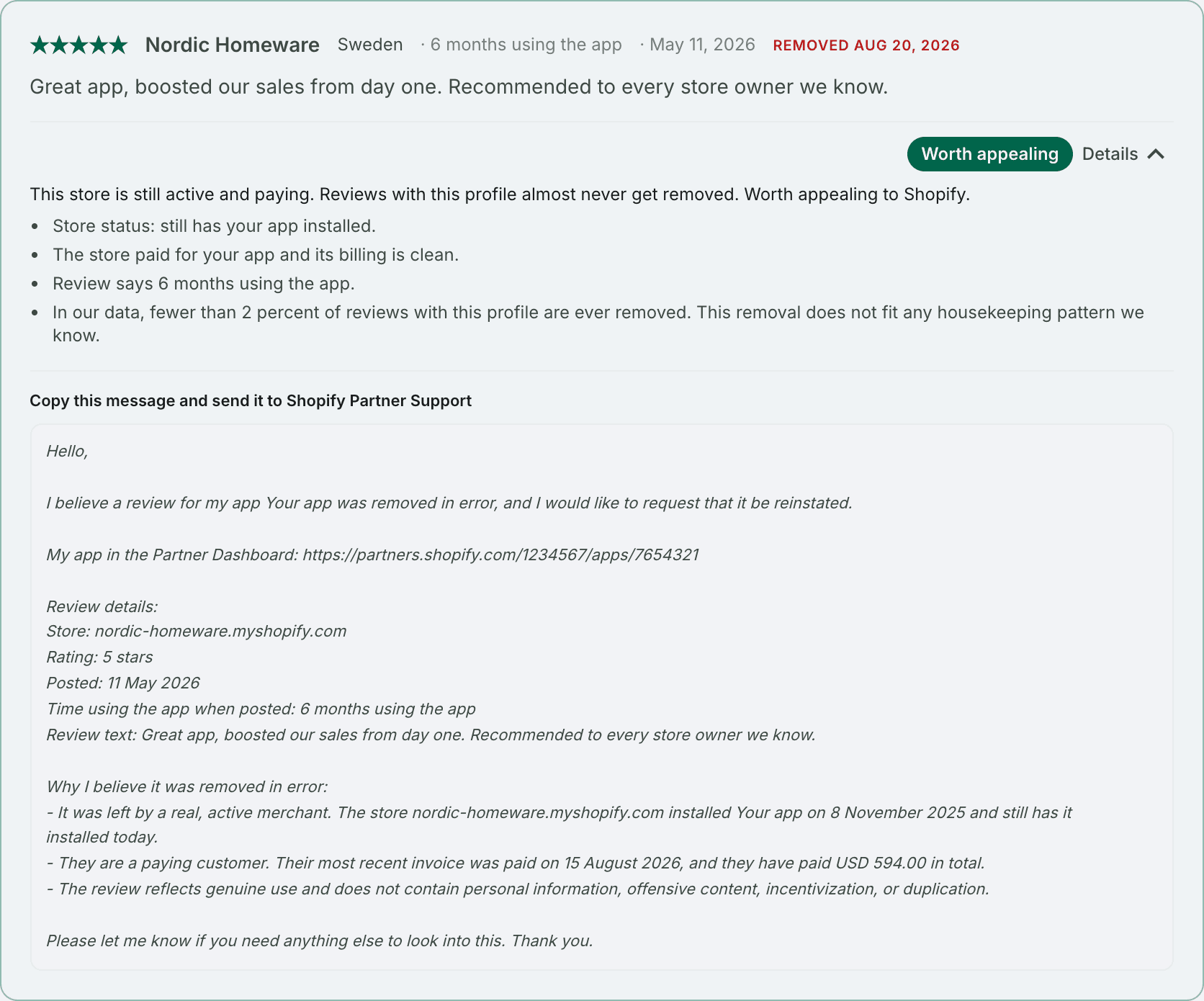
Open a review tagged Worth appealing. Under Details, AppstorePulse writes the appeal for you: the store, the rating, the dates, the review text, and the facts that show it came from a real, active, paying merchant. Copy it, then send it to Shopify Partner Support.
- Shopify asks for the URL of each store that left the review, a detailed description of why each review should be allowed, and any supporting evidence.
- Add what you have beyond the message: a support conversation with that store, for example.
- Shopify's Partner Governance team only replies when your evidence shows a mistake, and there is no set timeframe.
- Appeals are for real reviews only. A review that was paid for, fake or a duplicate will not come back.
Frequently asked
Does Shopify tell you when it removes a review of your app?
Not always. Shopify's help center says you may not get a notification when a review is removed. You do get an email when a review is published, which is why keeping your own record works.
Why does Shopify remove app reviews?
Reviews that go against its policies: fake or misleading reviews, reviews posted in exchange for a benefit, and several reviews from one account. Shopify doesn't share how it identifies them.
Can I get a removed review back?
If you believe it was removed by mistake, contact Shopify Support with the URL of the store that left it, why it should be allowed, and your evidence. Shopify only replies when the evidence shows a mistake.
Can I see reviews removed before I signed up?
No. AppstorePulse can only list removals of reviews it saw on your listing, so removals from before we first indexed your app can't be recovered.
Which plan do I need?
Your current reviews and an estimate of how many were removed are free. The full removed list, with the likely reason for each review and the Worth appealing flag, is on Starter ($49/month) and Pro ($99/month).