New apps go live on the Shopify App Store every day, and nothing tells you when one lands in your category. A week later it may already rank next to you. To keep up, you need two things: how many apps launched and where, and the list of the apps themselves. AppStorePulse gives you both from its daily App Store data: App Store Insights for the counts, Apps Gallery for the newest apps, and an email when a new app starts ranking for one of your keywords.
Before you start
- An AppStorePulse account. Apps Gallery is on every plan, including Free.
- A Starter or Pro plan for App Store Insights and email alerts.
- A Pro plan if you want new launches through the API or in Claude.
Why new launches matter
A new app in your category is a new rival on the same search results page. Spotting it in its first week tells you what it copies, what it prices, and which searches it goes after, before it has the reviews to pass you.
Launch counts also tell you about a category. If dozens of apps launch in your niche every week, it is getting crowded. If a neighbouring category sees a burst of launches, merchants may be asking for something new there.
Doing it by hand
Pick the App Store category pages and the searches that matter to you. Go through them on a fixed day each week and note every app you don't recognise. Open its listing: the app details show when it launched. Keep the name, developer, price and launch date in a spreadsheet.
It works for one category. You only see the apps that show up where you look, so a new app in a neighbouring category, or one that sits on page 3 for now, slips past. And you get no totals: you can't tell if 20 apps launched this week or 200.
The full walkthrough
Open App Store Insights
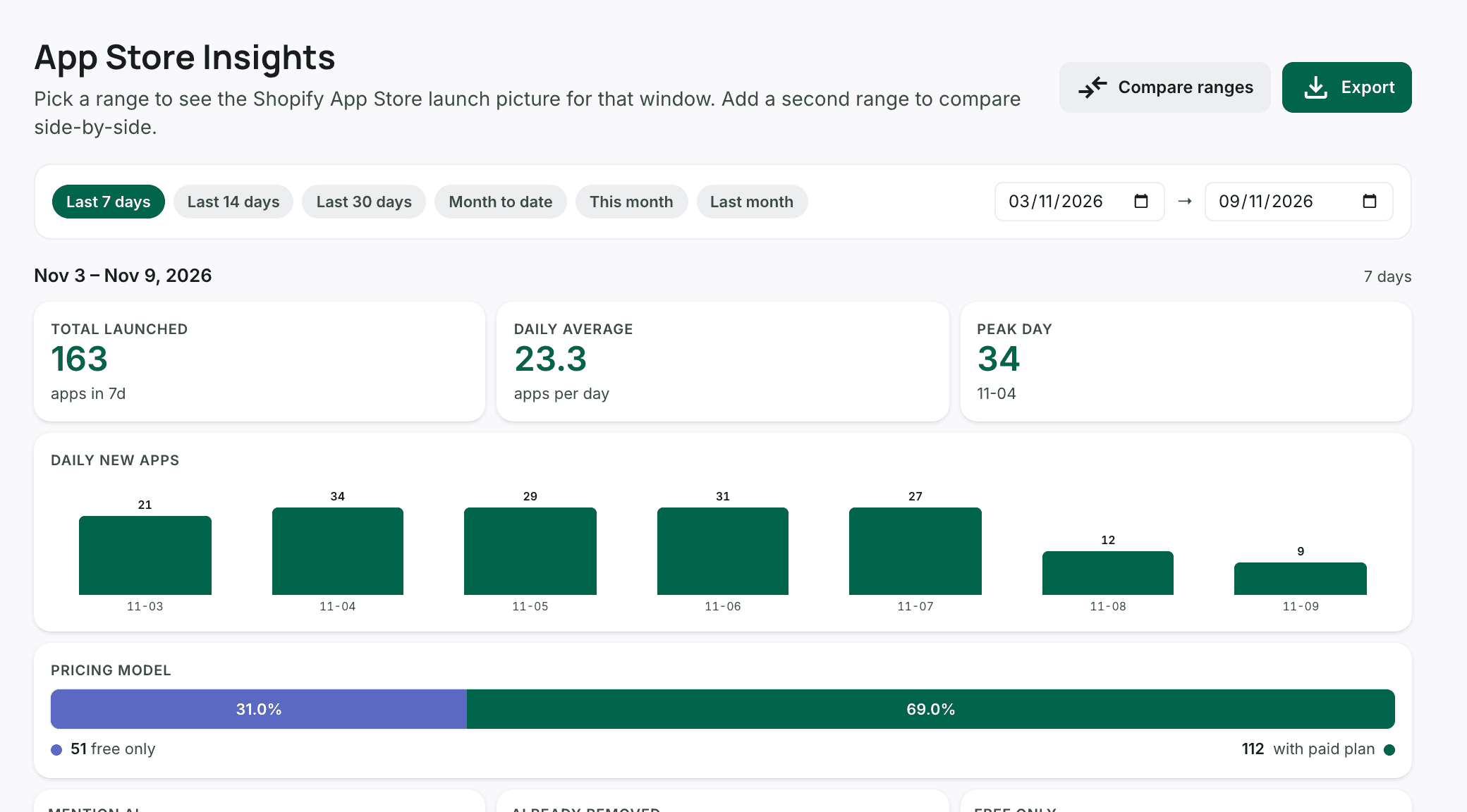
In the sidebar, under Market research, open App Store Insights. It opens on Last 7 days: how many apps launched on the Shopify App Store this week, the daily average, the busiest day, and a bar per day.
- Pick Last 14 days, Last 30 days, Month to date, This month or Last month, or set your own dates.
- Pricing model splits the launches into free-only apps and apps with a paid plan.
See where the new apps land
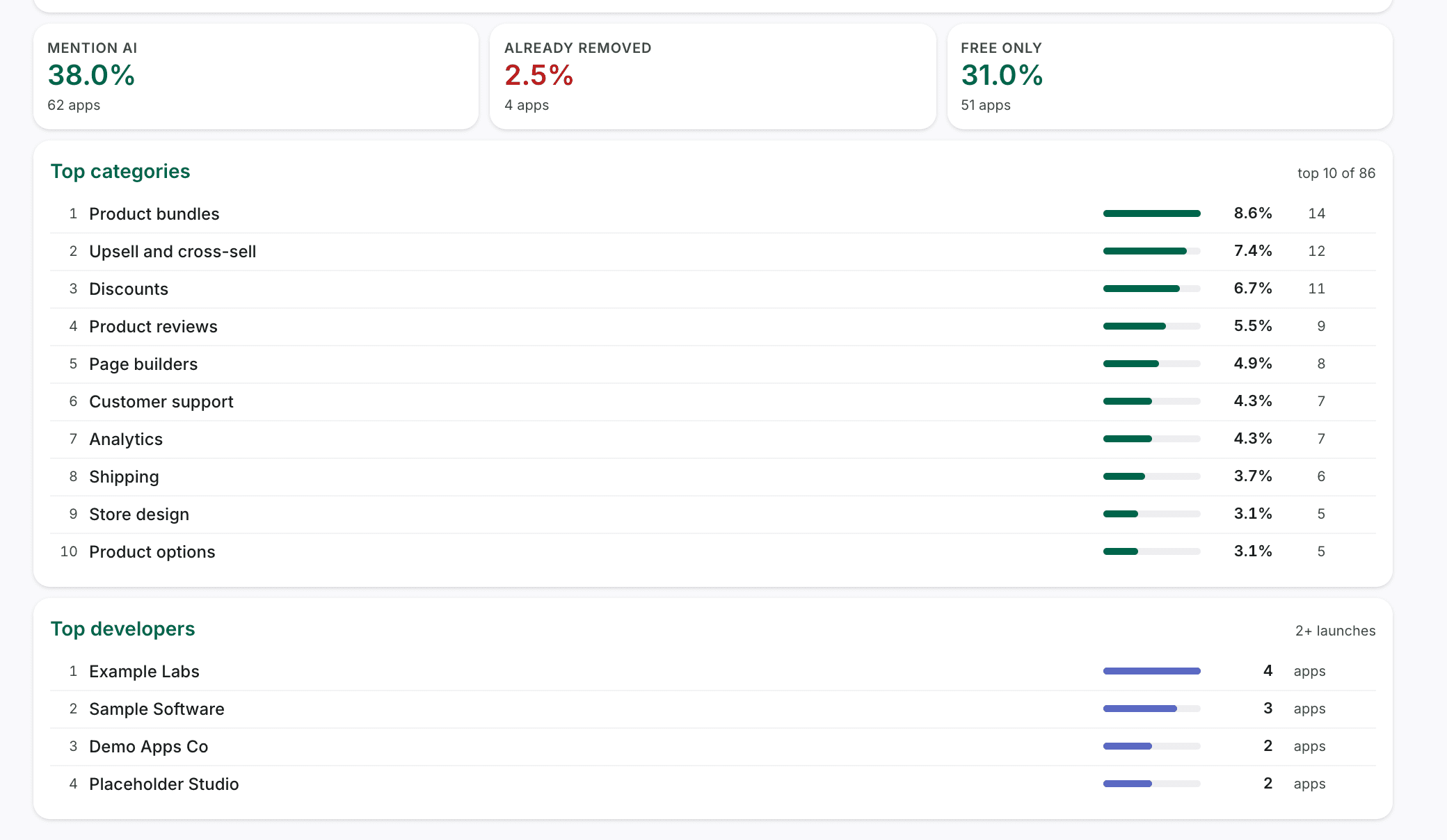
Scroll down. Three tiles show the share of new apps that mention AI, that were already removed, and that are free only. Below, the top 10 categories by launches and the developers who launched 2 or more apps in the range.
- Find your category in Top categories to see how many rivals joined it this week.
- A developer with several launches in one week is worth a look: they may be targeting your niche.
Compare this week with last week
Click Compare ranges. A second range opens with the period just before yours, and every number shows how it moved, with arrows. Click Export for a print-ready version you can save as a PDF.
List the newest apps in Apps Gallery
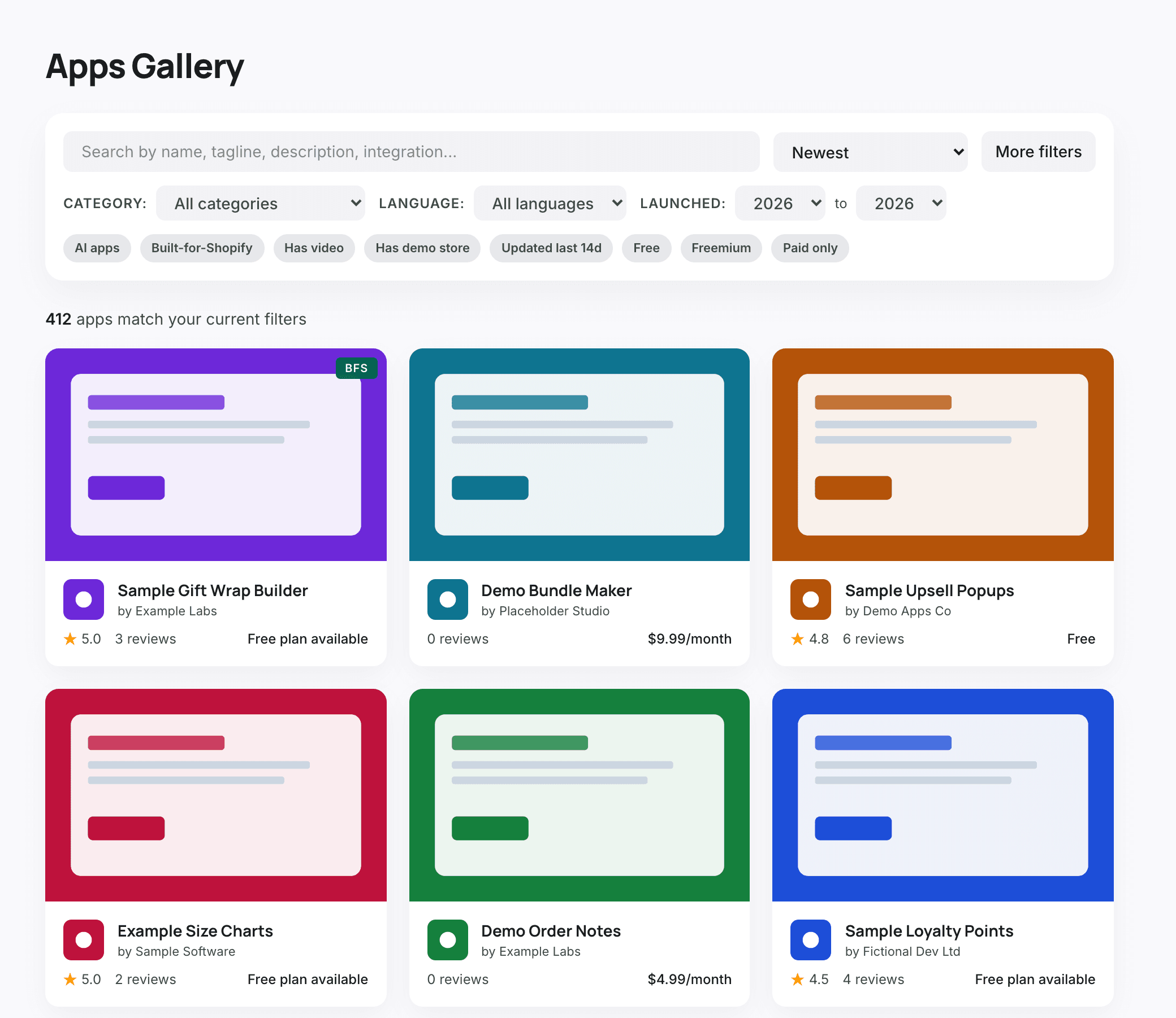
Insights counts the launches. Apps Gallery shows you the apps. Open Apps Gallery, set the sort to Newest, and pick the current year in Launched. The newest launches come first, and only apps still live on the App Store are listed.
- Pick your category to see only the new apps you compete with.
- Add filters: Free, Freemium or Paid only, Built-for-Shopify, AI apps, Has video, Has demo store, or a language.
- Search by name, tagline, description or integration to find new apps that do what yours does.
- Click a card to open the app's live App Store listing.
Get told when a new app enters your keywords
On Starter and Pro, open Settings, then Email Alerts, and turn on New apps for keywords. It is off by default. Your daily alert email then lists any app that wasn't ranking before and starts showing up in the search results for one of your tracked keywords, with its position.
Pull launches into your own tools (Pro)
On Pro, the REST API has a launches endpoint: GET /api/v1/launches returns apps newly listed across the App Store, with name, developer, category, rating, reviews, price and launch date. Filter by category and choose how many days back to look. The same data is in Claude through MCP: ask "Any new apps launched in my category this week?"
- API reference: /docs/api.
- Connect Claude: follow Connect AppStorePulse to Claude with MCP at /tutorials/connect-claude-mcp.
Frequently asked
Does Shopify list new apps somewhere?
Each listing shows when the app launched, but the Shopify App Store gives developers no count of launches and no feed of new apps per category. You have to check by hand or use a tool.
Can I see new apps in one category only?
Yes. In Apps Gallery, pick the category and sort by Newest. In App Store Insights, Top categories shows how many apps launched in each of the top 10 categories for the range.
Can I look further back than this week?
Yes. App Store Insights takes any date range we have data for, and Compare ranges puts two periods side by side. In Apps Gallery, the Launched filter goes back by year.
Which plan do I need?
Apps Gallery is on every plan, including Free. App Store Insights and the New apps for keywords email are on Starter and Pro. The launches API endpoint and MCP are on Pro.
Does it count apps that were removed after launch?
App Store Insights counts them in the total and shows how many were already removed. Apps Gallery lists only apps that are still live.