MRR is the monthly value of every subscription that is paying right now: each store's monthly price, with yearly plans divided by 12. Churn compares today with 30 days ago: the share of paying stores you lost, and the share of MRR they took with them. The Shopify Partner Dashboard has the raw events but not these numbers. AppstorePulse reads your Partner API data and shows MRR, ARR and three churn rates on one page, kept up to date.
Before you start
- Any AppstorePulse plan. Free shows MRR, ARR, the three churn rates and the 30-day MRR movement. Starter and Pro add the Over time charts, the stores behind each number and the Customers list.
- Your app added in AppstorePulse.
- Access to your Shopify Partner organization, to create a Partner API client with read access to financials and apps.
What the Partner Dashboard gives you
Shopify's Partner Dashboard shows the merchants who have your app, your earnings and an app history log of charge, credit and install events. You can export current merchants, earnings and history as CSV files.
None of these is MRR. Earnings are what Shopify paid you, after its revenue share, and they include usage and one-time charges. The merchant count includes stores on a trial, staff stores and development stores, so it is not your paying base either.
MRR and churn are the numbers investors, buyers and your own pricing decisions run on. Earnings move with payout timing. MRR shows the business you have today, and churn shows how fast it leaks.
Doing it by hand
Export your current merchants with their plans. Keep only the stores that are paying now. Add up each store's monthly price, and divide yearly plans by 12. That total is your MRR.
For churn, you need the same list from 30 days ago. Stores that were paying then and are not paying now are your churned stores. Their count divided by the paying stores you started with is logo churn. Their MRR divided by your starting MRR is subscription churn. Add downgrades, subtract upgrades, and you get net revenue churn.
It works once. It gets hard when you need it every month: trials, frozen and reinstalled stores, plan changes, annual plans and usage charges all need a rule, and you can't rebuild last month's list unless you replay every event from the app history.
The full walkthrough
Connect your Shopify Partner account
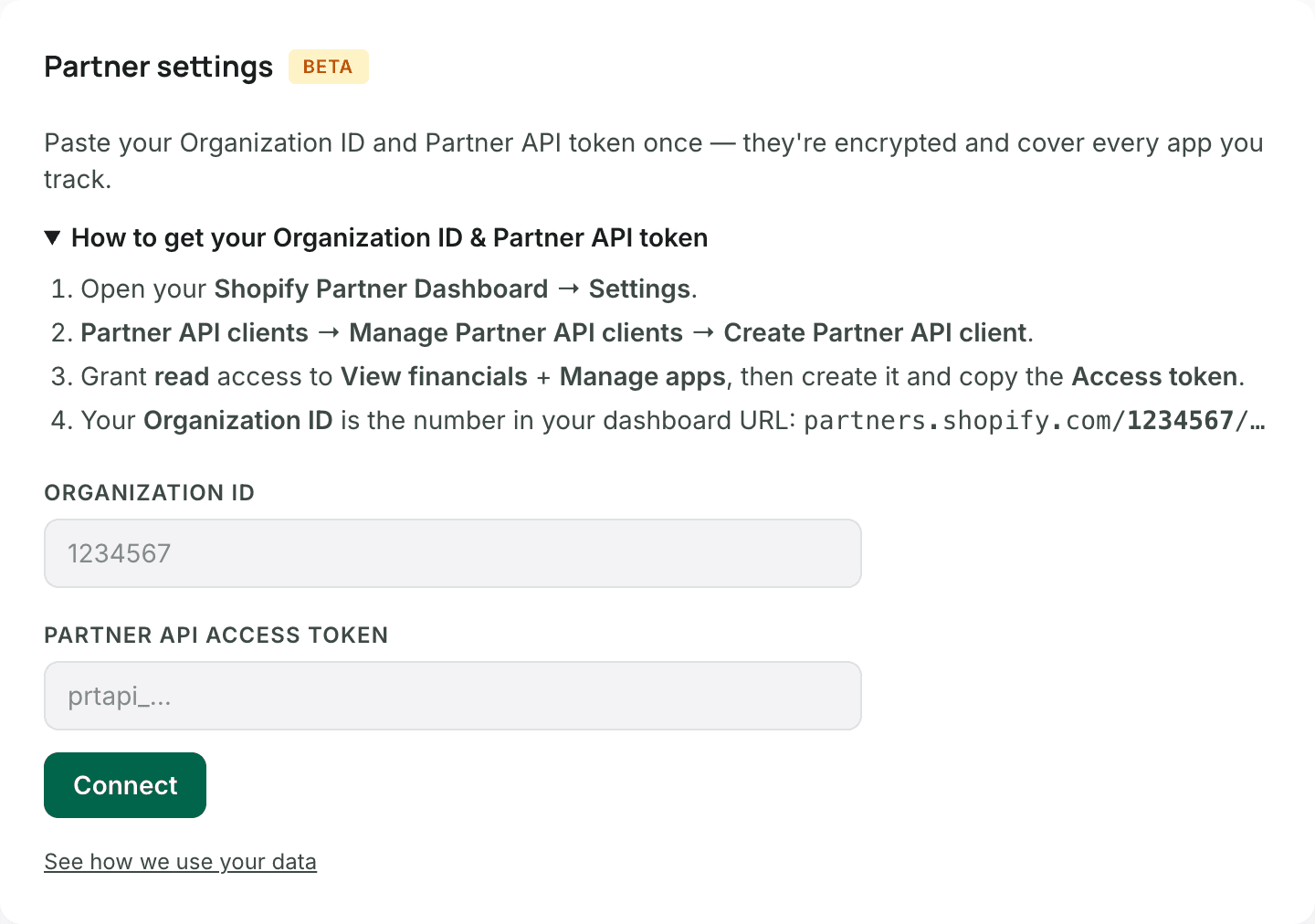
Open Settings and find Partner settings. Paste your Organization ID and a Partner API access token, then click Connect. The card explains where to find both. They are encrypted and cover every app you track.
- In the Partner Dashboard, go to Settings, then Partner API clients, and create a Partner API client.
- Give it read access to View financials and Manage apps, then copy its access token.
- Your Organization ID is the number in your Partner Dashboard URL.
- Pick which Partner app matches each app you track. AppstorePulse then gathers up to 2 years of history once and emails you when it is ready.
Read your MRR and ARR
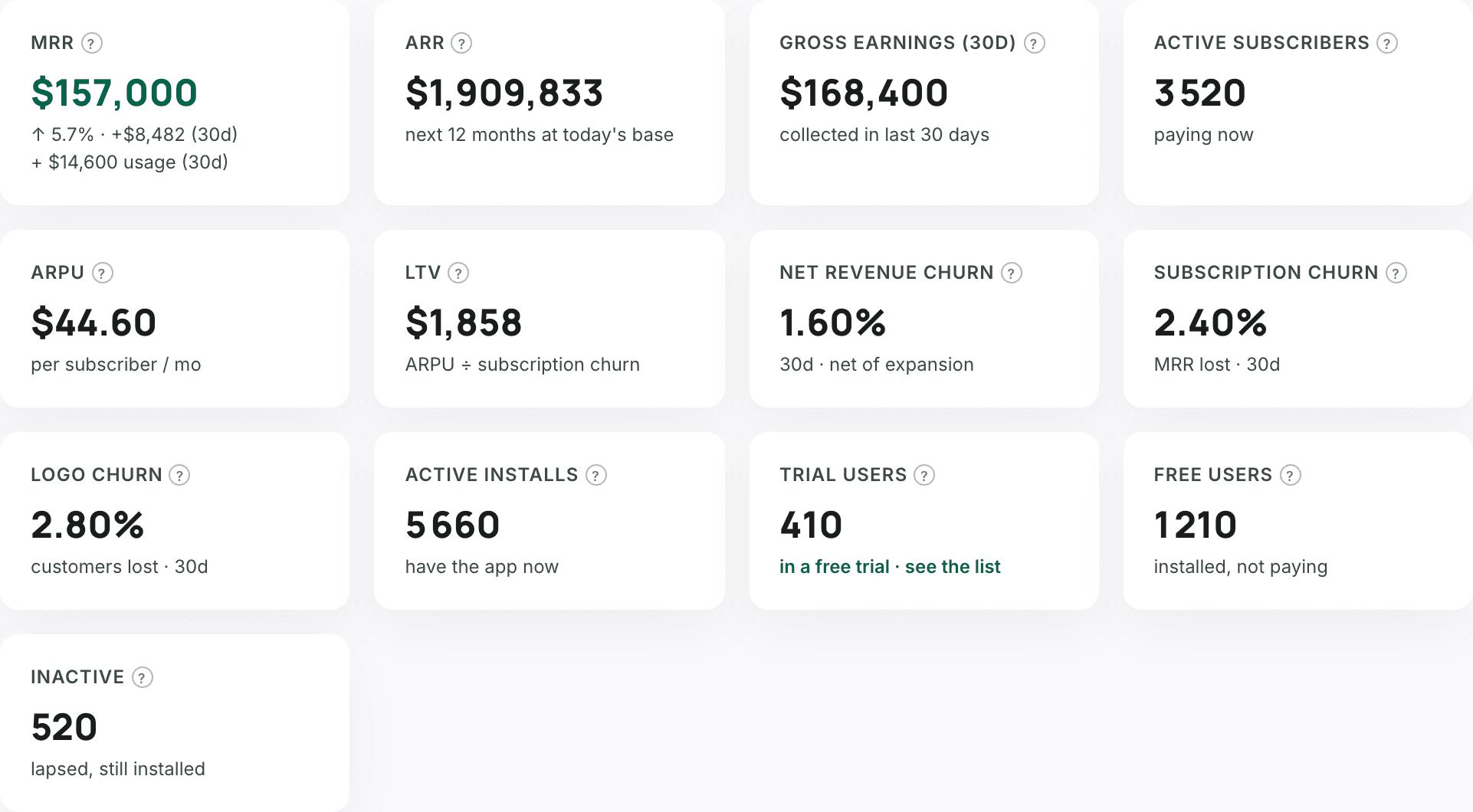
Open Revenue & Churn. The Right now row answers the question in one look. Hover the small ? next to any label for its exact definition.
- MRR: the plan value of every subscription active right now, yearly plans divided by 12. The line below shows how much it moved over the last 30 days.
- ARR: the next 12 months at today's base. Shopify bills monthly plans every 30 days, so monthly plans count at their price times 365/30 and annual plans at their yearly price.
- ARPU: MRR divided by active subscribers. LTV: ARPU divided by subscription churn.
- Trial users, Free users and Inactive stores have their own tiles and are not counted in MRR.
Read the three churn rates
Each rate compares today with 30 days ago, and each answers a different question.
- Logo churn: of the stores paying 30 days ago, the share that stopped paying. Every store counts the same.
- Subscription churn: of the MRR you had 30 days ago, the share lost to stores that stopped paying. A big plan weighs more than a small one.
- Net revenue churn: MRR lost to cancellations and downgrades, minus MRR gained from upgrades, divided by MRR 30 days ago. Below zero means your existing stores grew on their own.
- If logo churn is higher than subscription churn, the stores you lost were mostly small ones. If it is lower, check which big plans left.
Follow churn month by month
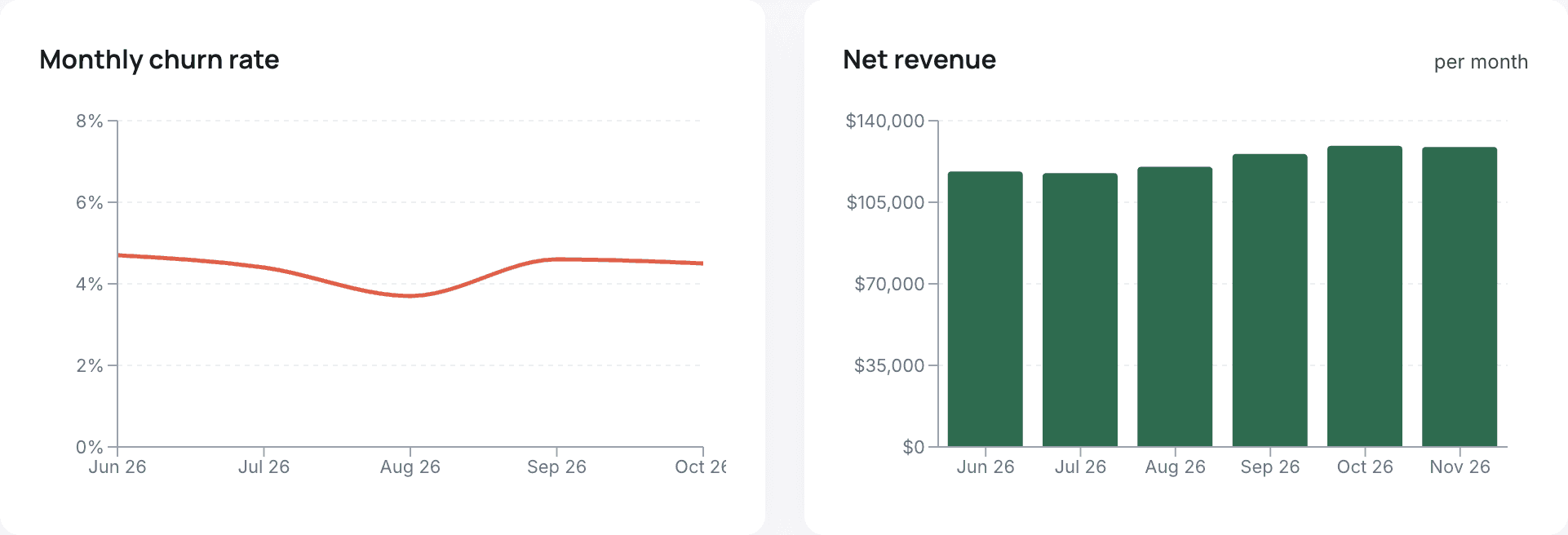
Below the Right now row, Over time shows your history. Pick 7 days, 30 days, 3 or 6 months, 1 or 2 years, a specific month, or your own dates. The Monthly churn rate chart shows the share of paying stores lost each month, next to net revenue per month.
Include usage charges if your pricing is usage-based
Usage charges are not recurring, so by default they are shown next to MRR, not inside it. If your app bills by usage, open the Usage charge control at the top of the page and turn on Include usage charges in MRR. MRR, churn, LTV and every subscriber number then follow that choice.
Combine apps and change currency
With two or more connected apps, the app picker at the top combines them into one MRR and one set of churn rates. The currency picker shows every amount in another currency, converted at the daily ECB rate.
Frequently asked
Does Shopify show my app's MRR?
The Partner Dashboard shows your earnings, the merchants who have your app and a history of charge and install events. Earnings are cash paid to you after Shopify's revenue share, so they are a different number from MRR. To get MRR, you add up the monthly value of every paying subscription.
Why is my MRR different from my Shopify earnings?
Earnings are money paid out over a period, after Shopify's share, including usage and one-time charges. MRR is the recurring value of the subscriptions active today. A new store adds to MRR the day its subscription goes live, before any payout.
Which churn rate should I watch?
Net revenue churn, because it includes downgrades and upgrades. Logo churn and subscription churn tell you whether you lose many small stores or a few big ones.
Are trials counted in MRR?
No. Stores still inside a free trial show in Trial users. They join MRR when their paid subscription starts.
How are yearly plans counted?
In MRR, a yearly plan counts at its yearly price divided by 12. In ARR, it counts at its yearly price.
How far back does the history go?
When you connect, AppstorePulse gathers up to 2 years of events and charges from the Partner API. Over time charts cover up to 2 years on Starter and Pro.