Every low-star review a competitor gets is a merchant explaining what they needed and didn't get. Read enough of them and the same complaints come back: a conflict with another app, a missing option, slow support. Those are the gaps you can close and the words to put on your listing. The hard part is reading hundreds of reviews across a whole category. AppstorePulse's Review Insights groups the reviews in your category into themes every week and lets you open each theme to read the reviews behind it.
Before you start
- A Starter or Pro plan. Review Insights is included in both.
- Your app added in AppstorePulse. Themes cover your app's category.
- The competitors you want to study added in Competitors, for the per-competitor activity and review lists.
Why competitor complaints are worth your time
Praise tells you what merchants expect from every app in your category. Complaints tell you where the apps you compete with fall short. When the same complaint shows up across several rivals, merchants are asking for something nobody does well yet.
Complaints also give you merchant language. If reviewers keep writing that a rival "conflicts with my discount app", that phrase, turned into what your app does well, belongs in your introduction and your feature list.
Doing it by hand
Open each competitor's reviews on the Shopify App Store and read the 1 to 3 star ones. For each review, write a short tag in a spreadsheet: pricing, support, bugs, a missing feature, a conflict with another app. Add the app, the date and the rating.
After a few dozen reviews, count the tags. The ones at the top are your themes. Read the developer replies too: they show which complaints a rival is fixing. It works for two or three rivals. Across a whole category, and again every month, it becomes days of reading.
The full walkthrough
Add the competitors you want to study
Open Competitors and add the apps you compete with, by name or App Store link. The apps that rank above you on your main keywords are a good start.
Open Review Insights and read the top complaints
Review Insights shows the reviews analyzed this week in your category, grouped into themes. Top complaints lists the recurring problems, each with the number of reviews behind it. Pick an earlier week to see whether a complaint is new or keeps coming back.
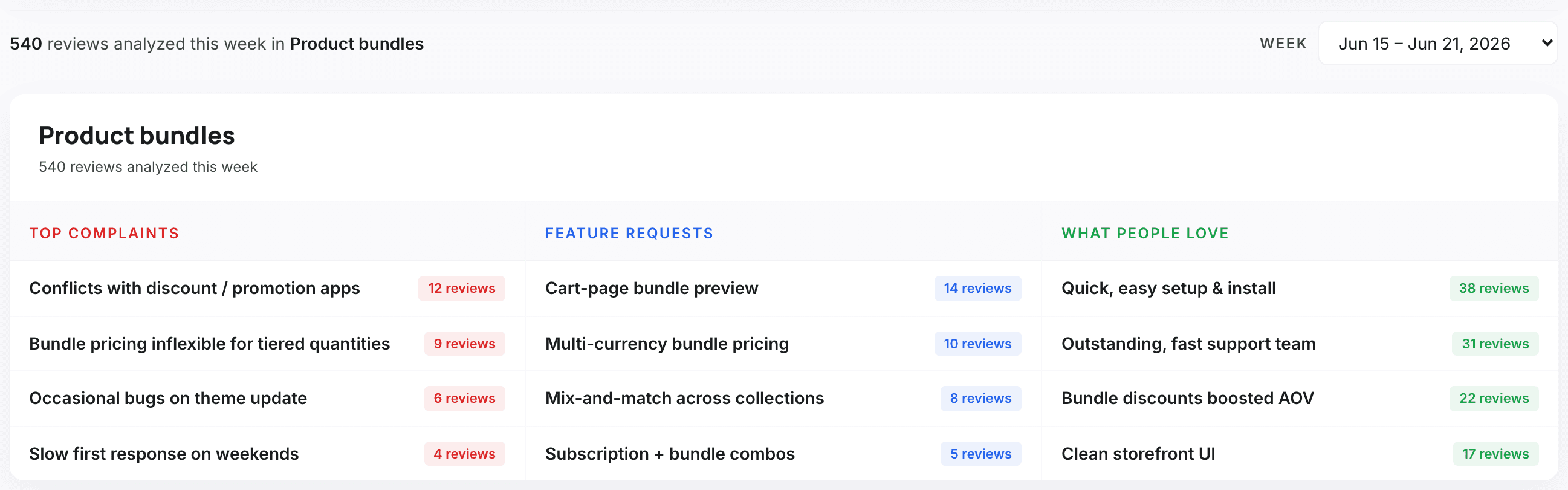
Open a complaint to read the reviews behind it
Click a theme. You get every review that fed it: which app it was about, the stars, the date, the country, a short summary of the point it makes, and the developer's reply if there is one. This is where you see which rivals the complaint is about and how they answer it.
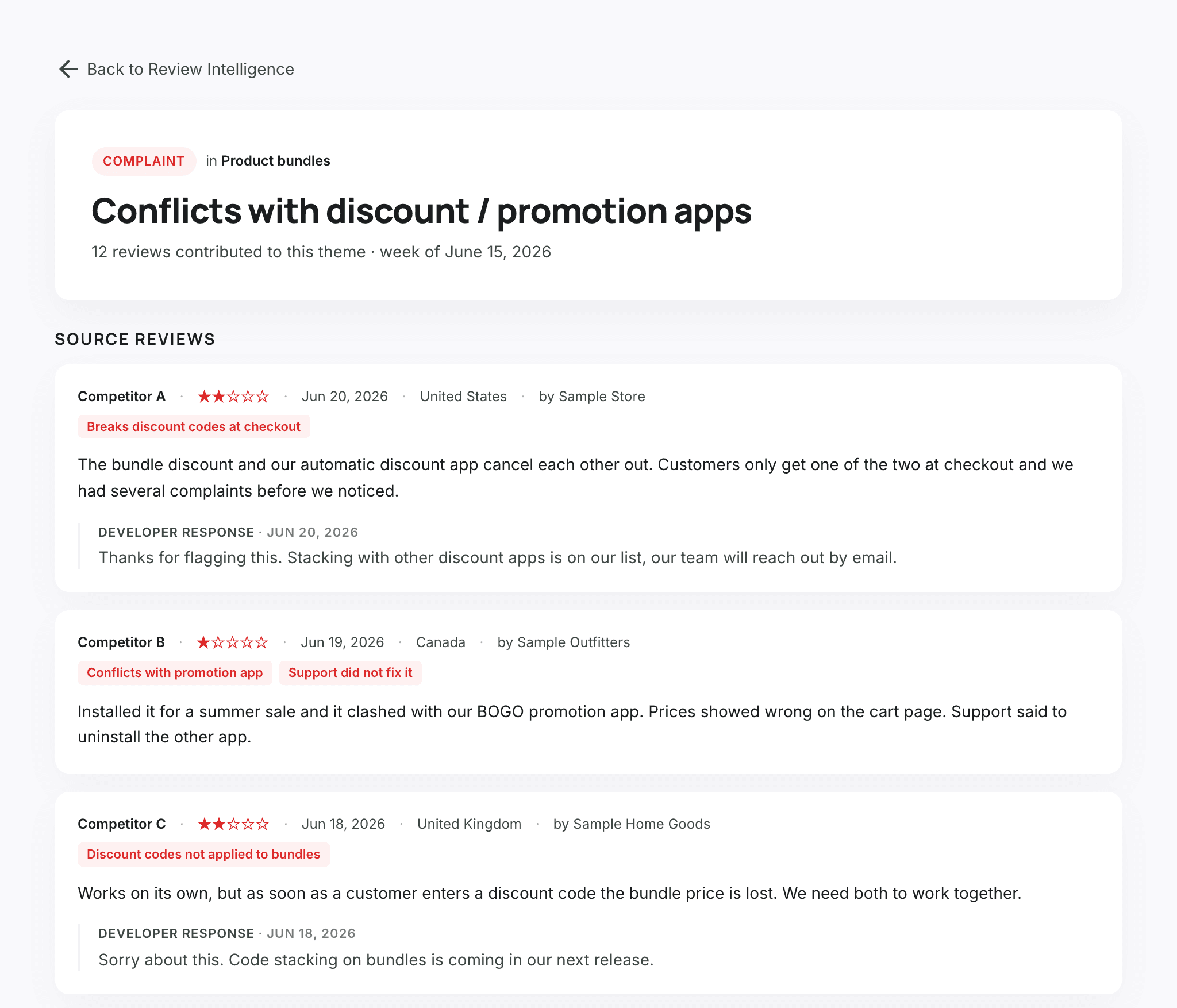
See which competitors are getting low ratings
Competitor activity lists each competitor you track with the reviews it received in the week and how many of them were low-star, plus how long reviewers had used the app before reviewing. A rival collecting low-star reviews is losing merchants you could win.
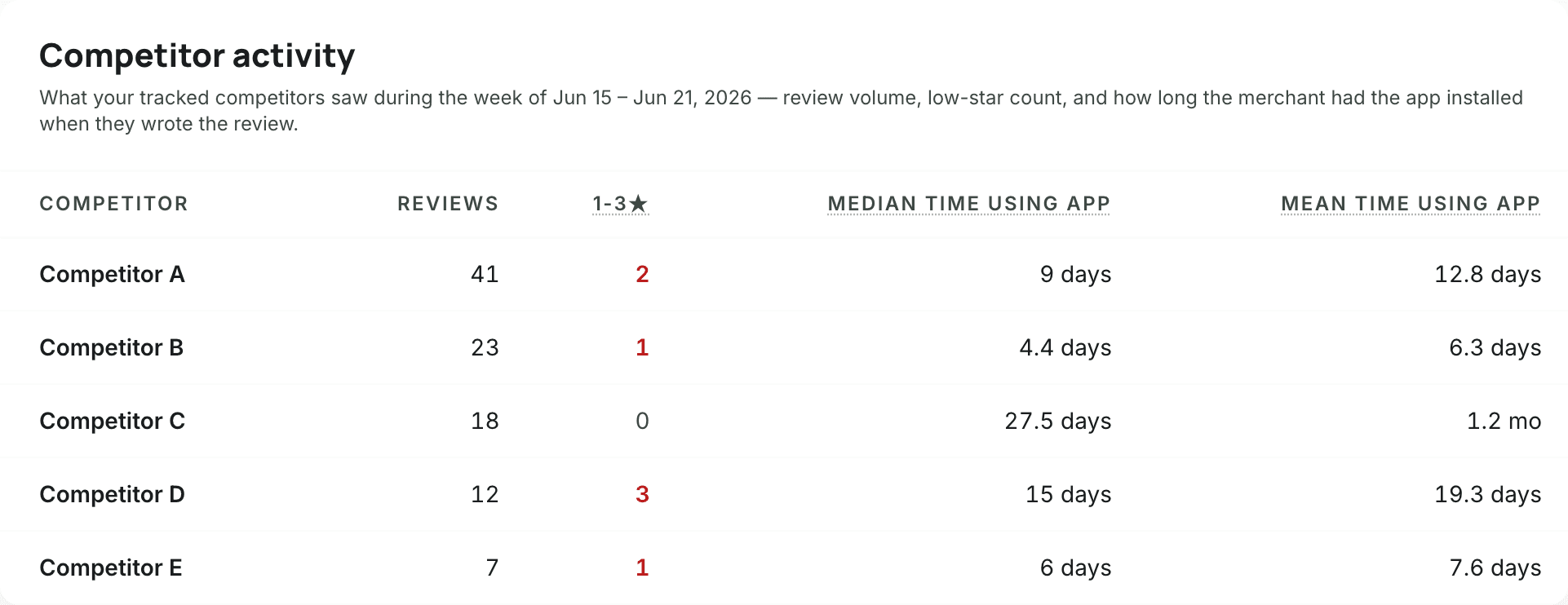
Read every review of one competitor
Open a competitor from Competitors. Its page lists the reviews we hold for it, newest first, including reviews that were later removed from its listing. Click a store to see the other reviews it left on the App Store.
Turn complaints into your positioning
Now act on what you read.
- If you already solve a common complaint, say it on your listing in the merchants' own words.
- If you don't, weigh it against your roadmap: a complaint that recurs across rivals is demand.
- On Pro, ask Claude through our MCP connector, for example "What do merchants complain about in this competitor's reviews?", and it reads the themes for any competitor you track.
Frequently asked
Can I filter Shopify App Store reviews by competitor complaint?
The App Store shows reviews one app at a time and doesn't group them by topic. To see recurring complaints you have to tag them yourself, or use a tool that groups them into themes.
Which reviews does Review Insights cover?
The reviews posted in your app's category, grouped into themes each week, so complaints about every app you compete with show up, not only the ones you track.
Can I go back to earlier weeks?
Yes. Pick any of the recent weeks from the week selector to compare themes over time.
Which plan do I need?
Review Insights is on Starter ($49/month) and Pro ($99/month). Asking Claude about a competitor's review themes through MCP is on Pro.